A new update to Accordance for iOS came out this week. Some of the updates are cosmetic, the reading experience is improved with a new theme, using “subtle earth tones, new icons and buttons.” A nine minute video was posted to YouTube highlighting the new features. The video indicates that more people use the iOS version than the desktop version.
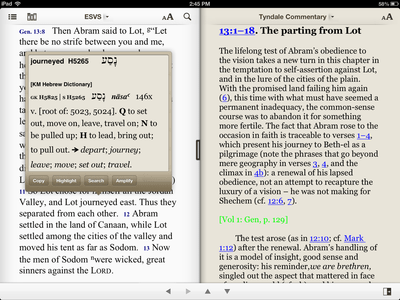 Accordance for iOS now allows you to sync notes, highlights, and User Tools using Dropbox. This allows you to use sync these items between platforms (desktop version and iOS version, both iPad and iPhone, etc.) By using Dropbox you can sync your notes without owning the desktop version. I really like the split screen mode, it works much better than the Logos iOS app. There is a button with auto-splits the screen. Another handy button is the “back” arrow, something that was missing in the earlier version. I still prefer to change pages with a right-left swipe, like a book and available in most readers (Kindle, Logos, Vyrso, Google Books, etc.)
The Free version has an ESVi Bible (for iOS), tagged with Strong’s numbers. Highlight an English word and the Hebrew or Greek word will appear in a floating window. You can “amplify” the word, which opens any Bible dictionary tools you have. The free version opens Easton’s Bible Dictionary. Selecting a word also allows you to highlight a text with a variety of colors or do a basic search for the word throughout the Bible. The free version also includes demos of Hebrew and Greek Bibles. Highlighting a Greek word opens a floating window with parsing information and lexical form, with a gloss from Mounce’s Greek Dictionary. The Hebrew works similarly, although it did not identify all the parts of a word (prefixed prepositions, definite articles, etc.) Only the root is identified and parsed, along with a gloss from the Kohlenberger-Mounce lexicon. One frustration, the floating window goes away after a a short time. Several times it automatically closed before I was finished.
If you are looking for a free Bible App for your iPad, be sure to check out Accordance.